Mastering the Snowflake Data Engineer Certificate with NotebookLM
The views I express here are mine alone and do not necessarily reflect the opinions or official position of my employer.
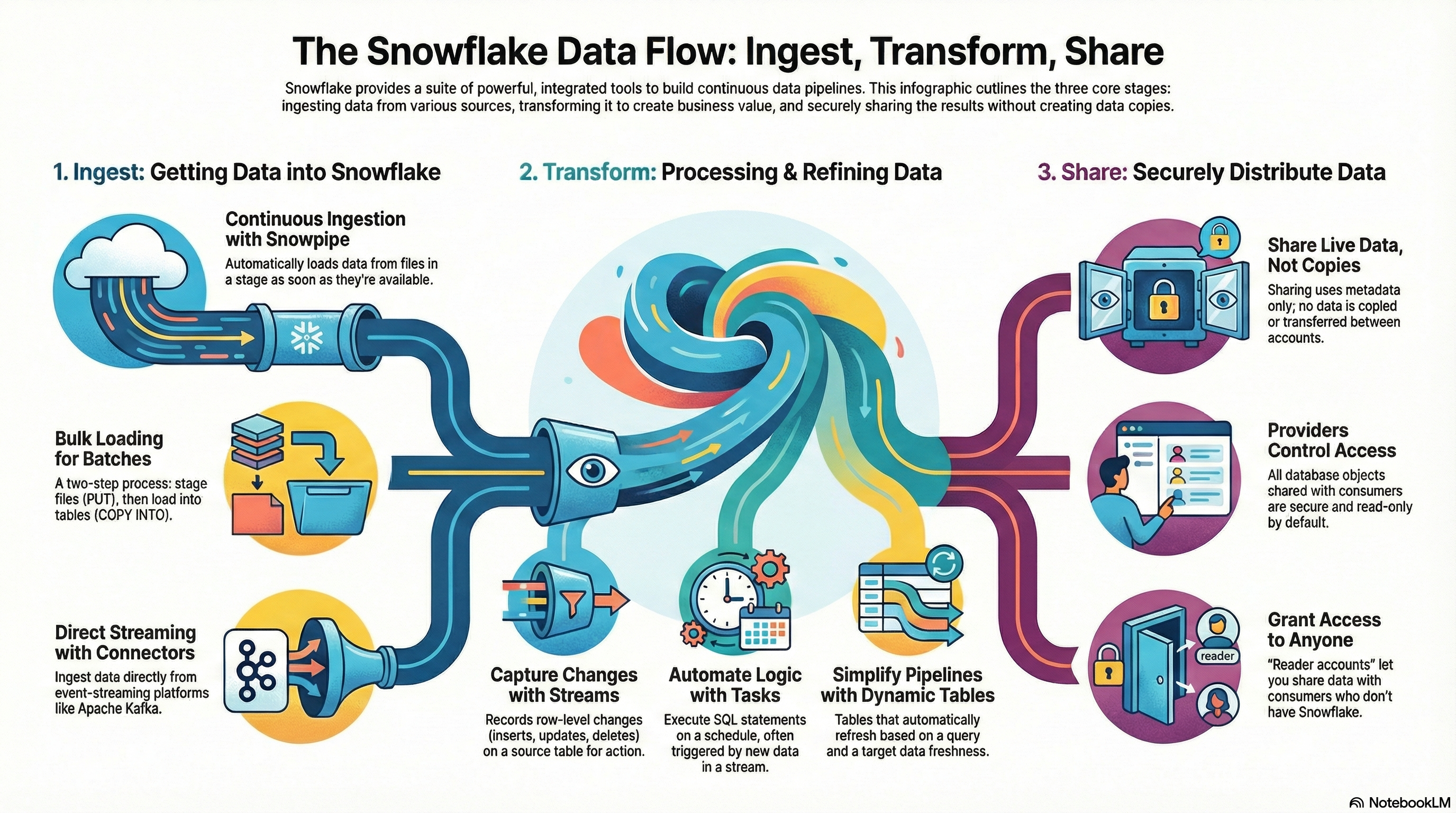
Image generated by NotebookLM
Preparing for the Snowflake Data Engineer Certification can be overwhelming given the breadth of topics and had to study the most up-to-date materials provided by Snowflake Data Engineer Exam Study Guide. I found that using NotebookLM was a game-changer in organizing my study materials, tracking progress, and deepening my understanding of Snowflake concepts. Here’s how I leveraged NotebookLM throughout my preparation:
1. Centralizing Study Materials
I started by gathering all relevant resources—official Snowflake documentation, blog posts, whitepapers, and my own notes from SnowPro Core Certification (please see the previous blog on how I studied SnowPro Core Certification). With NotebookLM, I could paste up-to-date documentation and links provided by the Exam Study Guide, and add my notes in one place. This eliminated the hassle of switching between tabs and searching for scattered files.
2. Creating Structured Notes
I broke down into 5 different NotebookLM notebooks with each focusing on 1 section of the exam topics, which are:
- 1.0: Data Movement
- 2.0: Performance Optimization
- 3.0 Storage & Data Protection
- 4.0: Data Governance
- 5.0: Data Transformation
For each notebook, I pasted the links provided by the Exam Study Guide, which was well within the limit of 50 (as of current limit for each notebook).
3. Leveraging Audio and Video Overview
For each notebook, I took advantage of NotebookLM’s "Audio Overview" and "Video Overview" features, accessible from the right sidebar. These tools automatically generate concise summaries of the selected topic, distilling the most important concepts and objectives—much like a focused lecture tailored to the exam blueprint.
The Audio Overview, in particular, offers an interactive experience similar to a podcast. I could pause, ask follow-up questions, and request clarifications on complex topics or specific examples. This made it feel like having a personal tutor available on demand, ready to explain concepts in simple terms or dive deeper as needed. Sessions typically lasted around 20 minutes, but with interactive questioning, I could extend them to explore topics thoroughly and ensure I truly understood the material.
The Video Overview provided a visual summary, often including diagrams walkthroughs those concepts, which helped reinforce my understanding and made it easier to recall key points during revision.
By integrating these overviews into my study routine, I was able to quickly grasp the main ideas of each section, clarify doubts in real time, and solidify my knowledge through both auditory and visual learning.
4. Interactive Q&A
One of NotebookLM’s most powerful features is its AI-powered interactive Q&A. Unlike many other LLM-based tools, NotebookLM not only answers your questions but also highlights the exact sources within your uploaded materials for every response. This transparency ensures you can quickly verify the information, reducing the risk of hallucinations and making it easy to trace concepts back to the official documentation or your own notes.
For example, I could ask, “What is the difference between a scope URL, pre-signed URL, and file URL?” or “Explain the difference between transient, temporary, and permanent tables.” NotebookLM would generate concise, accurate answers, clearly referencing the relevant sections from my study materials. If the answer isn’t found in your documents, NotebookLM will let you know and may attempt to supplement with external information—but always with a clear indication, so you know when to fact-check.
Additionally, NotebookLM suggests follow-up questions, prompting you to explore related topics you might not have considered. This guided, source-backed Q&A experience made my study sessions more efficient and trustworthy compared to generic chatbots.
5. Practice Questions and Flashcards
I made extensive use of the Flashcard and Quiz Studio features in NotebookLM, both accessible from the right sidebar. After each study session, I used the flashcards and practice questions based on the material I had just reviewed. This active recall approach helped reinforce key concepts and highlighted areas where I needed further study.
When reviewing flashcards or answering quiz questions, NotebookLM provides immediate feedback. If I answered incorrectly or wanted more context, I could simply click the "Explain" button. This would prompt NotebookLM to generate a detailed explanation in the chat area, often referencing the exact source material from my notes or uploaded documents. This feature not only clarified misunderstandings but also deepened my comprehension by connecting answers directly to authoritative sources.
By regularly practicing with flashcards and quizzes, and leveraging the explain functionality for in-depth answers, I was able to systematically strengthen my knowledge and address gaps before the exam.
TL;DR: Tips for Using NotebookLM Effectively
- Organize your notebooks to align with the exam blueprint, dedicating a separate notebook to each major topic for focused study
- Take advantage of the Audio and Video Overview features to get concise summaries and visual explanations of complex topics—these can help reinforce your understanding and make revision more engaging
- Actively use the Q&A feature to test your knowledge, clarify doubts, and explore related topics, always checking the cited sources for accuracy
- Incorporate practice questions and flashcards after each study session to reinforce key concepts and identify areas needing further review
- When reviewing flashcards or quiz questions, use the "Explain" option to get detailed, source-backed explanations for deeper comprehension
By integrating NotebookLM into my study routine, I was able to stay organized, deepen my understanding, and approach the Snowflake Data Engineer Certification exam with confidence. Give it a try—you might find it as invaluable as I did!
Here's a video on brief introduction on how I used NotebookLM while studying Data Engineer: Effective Study Techniques for the Snowflake Data Engineering Advanced Certificate - recommended to watch it in 2x speed.
Here are the "Video Overview" that I've used NotebookLM to generate: